Internet Cafe 98 Getting Started Guide
One trash PC, dial-up vibes, and a clear plan for the first profitable hour.
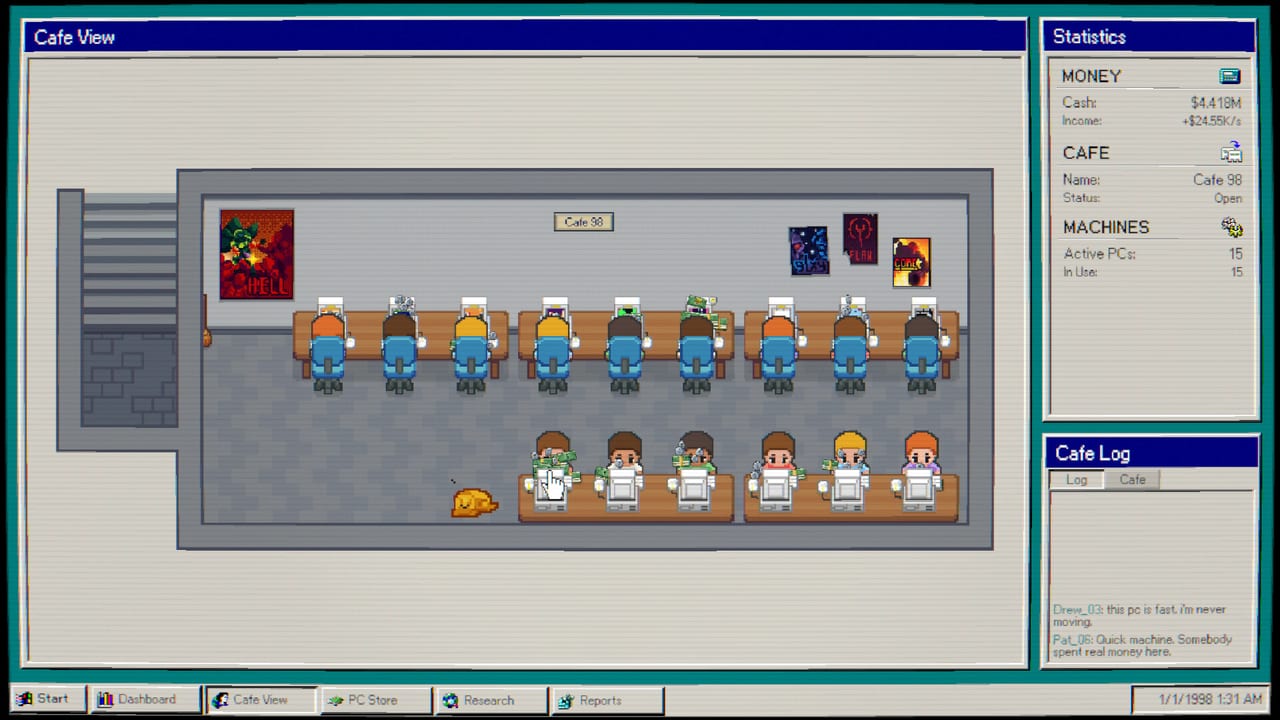
Internet Cafe 98 drops you into a 1998 internet cafe rendered as a living Windows 98 desktop. Your first machine is trash hardware. Your network feels like 28.8k dial-up. Customers still show up, and every session fee, coffee sale, and cleaned drive pushes you toward better parts, faster research, and a bigger floor. This guide is the day-one path: learn the UI, finish the tutorial cleanly, spend cash in the right order, and leave hour one with a cafe that earns instead of stalls.
The game is a single-player retro incremental tycoon from GrindWill Labs, published with GrindWill Interactive and Stay2Busy. Full release is November 23, 2026 on Steam for Windows and macOS at $6.99 (launch week 10% off to $6.29 through November 30, 2026). A free demo is available as Steam app 4225170. Steam Achievements, Steam Cloud, and Family Sharing are supported. For store and Discord links, see Links.
What you are optimizing for
Early Internet Cafe 98 is not about owning the most desks. It is about raising income per seat while unlocking the systems that make the next upgrade cheaper or stronger. Reliable beginner coverage repeats the same priorities:
- Upgrade the first PC before you buy a second desk.
- Research early instead of hoarding points.
- Keep coffee stocked so sessions do not die on empty cups.
- Clean hard drives regularly for side income and fewer headaches.
- Expand only when current desks already earn well.
Those five rules are the spine of this page. PC Building, Research, Customers, and Expansion each go deeper once the loop clicks.
Desktop UI and first clicks
The presentation is a point-and-click Windows 98-style shell. Expect classic window chrome, desktop icons, and cafe tools that feel like period software rather than a modern HUD. Your early actions usually sit in a few buckets:
- Cafe floor / desk view — see machines, seating, and customer flow.
- PC builder / parts — spend cash on CPU, RAM, GPU, and related upgrades.
- Network — raise capacity so more or longer sessions stay stable.
- Research — spend research progress on hardware and system unlocks.
- Ops — coffee stock, cleaning, lost files, and complaint handling.
Demo patches already smoothed the start and tutorial (July 25), moved internet capacity upgrades earlier with clearer research (July 27), and later added a new cafe view plus macOS and QoL work (October 19). If something in an older video looks different, check Updates for the current flow, then return here.
Click through every tutorial prompt once without skipping. The game teaches the earn → upgrade → unlock loop intentionally. After the tutorial ends, pause buying and open your mental checklist: is the first PC still junk while you stare at a second desk? If yes, fix the PC first.
Demo versus full game
The free demo is the right place to learn the desktop, early research, and cafe ops without buying the full release. Expect the core loop—customers, parts, network, research, coffee, drive cleaning—to match. The full game extends that loop: more rooms, worldwide cafes, intercontinental cables, and the full set of licensed retro games you can play yourself (ten playable titles in the complete package).
If you are evaluating the purchase, play the demo until you have upgraded the starter PC, completed a few research unlocks, and run coffee plus cleaning without constant crises. That is enough signal to know whether the tycoon loop fits you. Save files and Steam Cloud behavior can differ between demo and full product; treat the demo as a systems preview, then start fresh or migrate according to whatever the current Steam page describes on launch week.
First-hour checklist
Work this list in order. Do not skip ahead to expansion fantasy while the starter seat is still weak.
Minute 0–15: tutorial and orientation
- Complete the tutorial without rushing past research and network prompts.
- Locate PC upgrades, research, coffee, and cleaning tools in the desktop UI.
- Serve your first customers and note what they complain about in chat.
- Confirm coffee is stocked before you leave the floor idle.
Minute 15–35: one strong seat
- Spend early cash on the first PC (CPU/RAM/GPU as needed) rather than a second desk.
- Push an early research unlock that helps internet capacity or income—see Research for priority logic.
- Clean the hard drive when the prompt or schedule appears; do not let junk pile up.
- Keep an eye on session length: better hardware and stocked coffee both help customers stay.
Minute 35–60: stabilize then scale
- Reinvest profits into the same seat until income feels consistent.
- Stock coffee again; empty cups kill throughput faster than players expect.
- Dig lost files when you have spare attention—side cash funds the next part.
- Only then consider a second desk or a wall knock. If the first seat still underperforms, keep upgrading. Details live in Expansion and PC Building.
Use the Upgrade Checklist as a running to-do list, and cross-check early purchases against Early Game Upgrades and the broader Tier List.
Money mistakes to avoid on day one
Buying desks too early. A second weak machine splits your attention and your upgrade budget. One upgraded seat usually out-earns two trash seats.
Ignoring research. Hardware shelves are gated by tech. Sitting on research progress while you only buy visible parts slows every later system.
Forgetting coffee. Customer ops are not optional flavor. Empty stock means shorter sessions and more chat complaints—covered in Customers.
Skipping drive cleaning. Cleaning and lost-file digs are steady side income and keep the floor from feeling cursed. Schedule them like you schedule part buys.
Expanding on vibes. Knock walls and open rooms when current desks are healthy, not when you are bored. Expansion multiplies whatever economy you already have—good or bad.
How the mid-game opens from a clean first hour
If hour one went well, you should have: a noticeably better starter PC, at least one meaningful research unlock, coffee habits in place, and cleaning on a rhythm. From there:
- Deepen part choices with PC Building.
- Plan the tech tree with Research.
- Grow the floor and eventually the world with Expansion.
- Keep satisfaction high with Customers.
When patches land, skim Updates before you rewrite your mental priority list. Demo history already showed that tutorial pacing and early internet upgrades can shift; full-game balance will too.
Quick reference: day-one priorities
| Priority | Action | Why |
|---|---|---|
| 1 | Upgrade first PC | Income per seat beats seat count early |
| 2 | Spend research | Unlocks capacity and better parts |
| 3 | Stock coffee | Protects session length |
| 4 | Clean drives / dig files | Side income and fewer issues |
| 5 | Add desks / expand | Only after current seats earn well |
Print that table into your brain, then keep the Upgrade Checklist open while you play. When you want ranked shopping order instead of a narrative walkthrough, open Early Game Upgrades.
You do not need perfect play on day one. You need a cafe that earns, researches, and stays stocked. Everything else on this wiki assumes that foundation.
Frequently Asked Questions
Quick answers for cafe owners still learning the dial-up grind.
Should I buy a second desk in the first hour?
Usually no. Upgrade the first PC until it earns well, then add seats. See PC Building and Early Game Upgrades for spending order.
Is the free demo enough to learn the game?
Yes for the core loop. The demo (Steam app 4225170) teaches desktop UI, early upgrades, research, and cafe ops. Worldwide franchises and full cable play are full-game topics in Expansion.
What should I research first?
Favor unlocks that raise internet capacity or income before cosmetic or late systems. Full priority notes are in the Research Guide.
Why do customers leave or complain early?
Weak hardware, empty coffee, or neglected cleaning are the usual causes. Fix ops with the Customers Guide before you expand.
Where can I track patches and launch changes?
Does Internet Cafe 98 support macOS at launch?
Yes. The full Steam release targets Windows and macOS. Demo QoL and macOS work were called out in the October 19 demo patch notes on Updates.